
PREPAREDNESS / BACKUP COMMUNICATIONS
Best Battery Backups
for Routers & Modems
By Ready & Resourceful · November 20, 2026 · Research-based buying guide
The lights go out. Your connection doesn’t have to. Choose the right backup—and know when a battery won’t help.
AC BACKUP / ORIGINAL ADAPTERS / ESSENTIAL LOADS
START HERE
One dead box.
No internet.
A powered router is only part of the story. Your modem or fiber ONT needs power too—and your provider’s network still has to work.
First trace the connection. Then buy the battery.
FIND YOUR BACKUPA blackout exposes the weakest link.
The power goes out. Your laptop still has a battery, your phone still sees the home WiFi network, and the router's lights are on. Yet nothing loads. The missing piece might be an unpowered modem, a fiber ONT in another room, or equipment outside your home that your UPS cannot reach.
That is why buying a battery backup for router and modem starts with tracing the connection. A bigger battery attached to the wrong box is not a better preparedness plan. Start with what must remain powered, decide what you need the connection for, and then choose a backup that fits the equipment and your target operating time.
This guide focuses on small household network loads during outages. It does not rank these products by hands-on testing: we reviewed manufacturer specifications and manuals, compared their installation constraints, and developed original planning examples. Prices, stock, exact low-load runtimes and operation with your particular adapters have not been independently measured.
Three battery backups worth comparing
Start with the correct electrical market. The two AC units below are U.S. 120V models with NEMA connections; they are not recommendations for plugging into UK or European mains. The Eaton entry is the UK BS-input variant. Regional versions and similarly named products can differ.
THE AC STARTING POINT
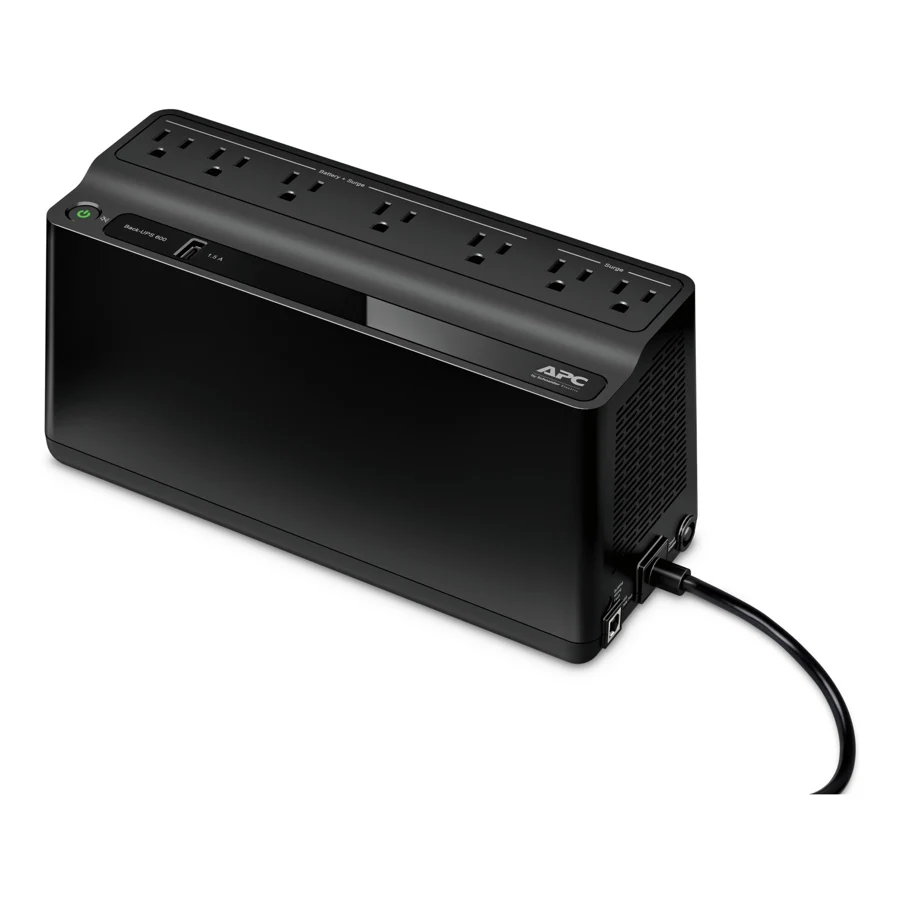
APC Back-UPS BE600M1
600VA / 330W · 120V · five battery-backed AC sockets
Its five battery-backed sockets can accommodate a modem, router and another required local device when plug clearance and total load allow. Retaining the original adapters avoids substituting new DC outputs.
Tradeoff: Bulky adapters can block neighbouring outlets. The power rating is not stored energy; verify the runtime curve at your own load.
Who should skip it?
Avoid this U.S. model on UK/European mains or if your required duration exceeds verified low-load operation.
THE COMPACT ALTERNATIVE
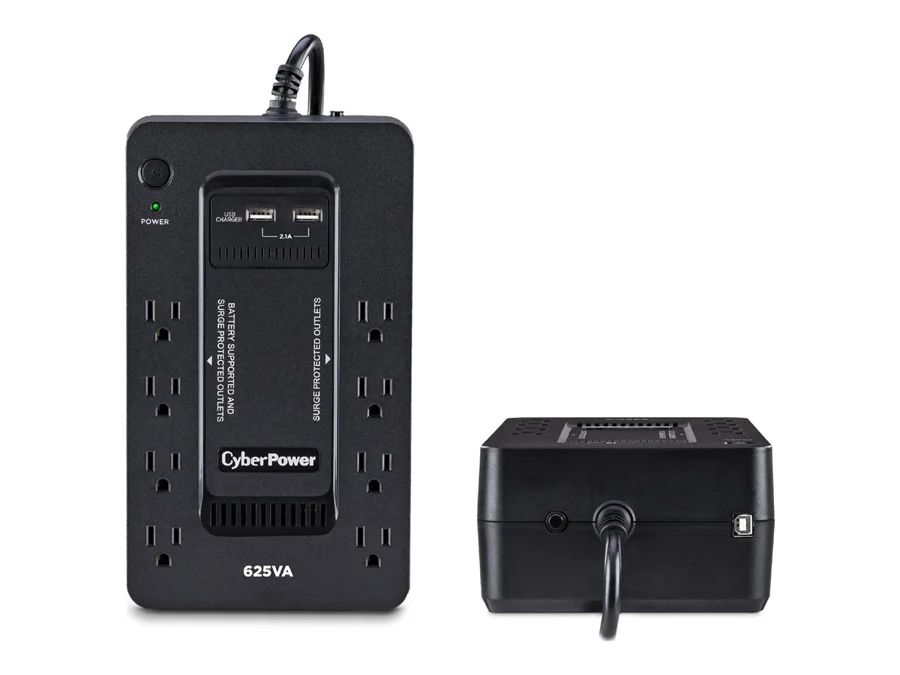
CyberPower ST625U
625VA / 360W · 120V · four battery-backed AC sockets
A compact alternative for a small network when four battery-backed outlets are enough. Clearly separate those four from the four surge-only outlets.
Tradeoff: Its published high-load runtime points are not router-runtime measurements. Battery replacement is not a routine user task on this model.
Who should skip it?
Avoid it if easy user battery replacement is a requirement or its supported runtime cannot meet your plan.
THE DIRECT-DC OPTION
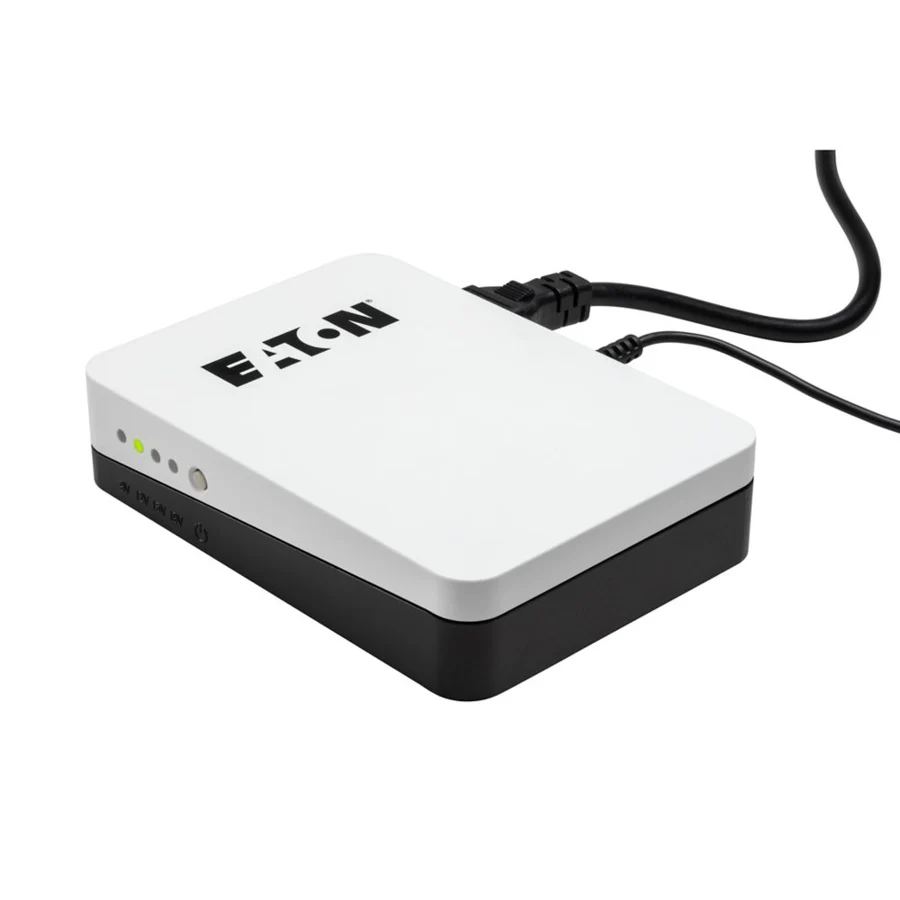
Eaton 3S Mini 3SM36B
36W · selectable 9/12/15/19V DC · UK BS input
Useful when one compatible gateway is the whole local load, or when you deliberately plan separate backup for other required equipment. Its compact direct-DC approach avoids keeping the original AC adapter in the output path.
Tradeoff: Four supplied barrel tips are alternatives, not four simultaneous outputs. Confirm the exact voltage/current combination, polarity and physical fit.
Who should skip it?
Avoid it for 5V devices, unsupported PoE equipment, unmatched tips or an improvised two-device splitter.
As an Amazon Associate, Ready & Resourceful earns from qualifying purchases. Amazon buttons open exact-model searches, not verified offers. Confirm the seller, regional version, model and current specifications. Manufacturer links are included so you can check the evidence before purchasing.
Actual product photographs: Schneider Electric/APC, Eaton, and SHI/1WorldSync for CyberPower. Images identify the equipment; no hands-on testing is implied.
Watch the weak link disappear.
Original animated R&R dependency map with synthetic narration. Illustrative planning explainer; no product test footage.
Read the video transcript
A router battery backup does not guarantee working internet. First, trace the whole connection. A separate modem or fibre terminal also needs power. For an AC UPS, keep the original adapters and identify the battery-backed sockets. For a direct-current backup, match voltage, current, polarity and connector. Included tips are not necessarily multiple outputs. Then measure your total load. Watts and VA are power ratings, not hours of battery life. Use the exact runtime curve or a clearly labelled energy estimate. Finally, check ordinary internet access using the supported test procedure. Keep a charged phone and another way to receive official updates. Back up the connection, and plan for the network to fail.
Map every powered box between the wall and your phone
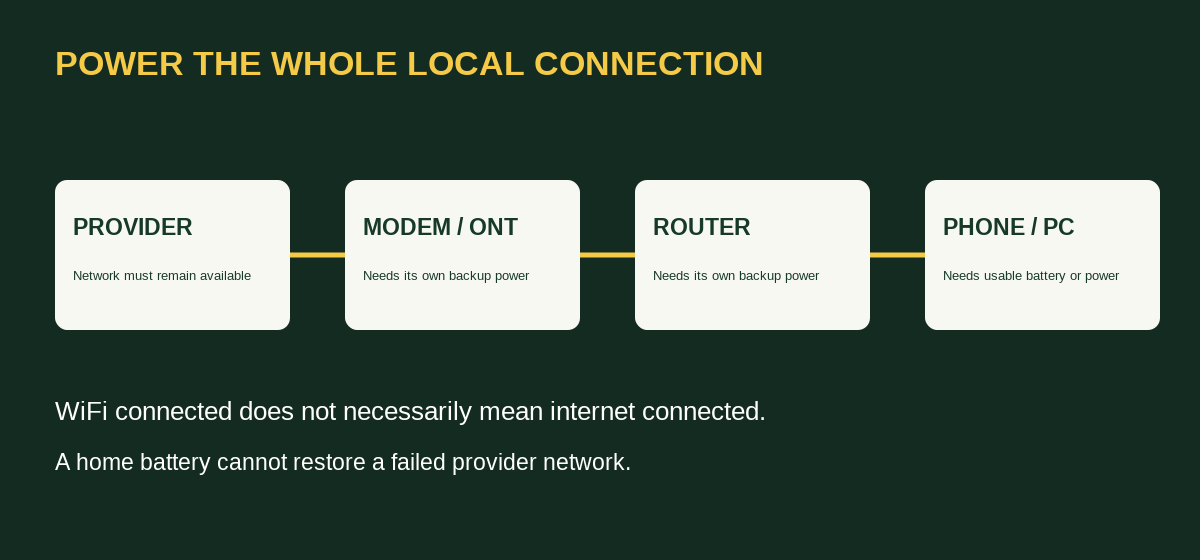
Cable: modem plus router
If these are separate devices, both need power. A combined gateway may put both functions in one housing. Check for additional powered equipment rather than assuming one visible WiFi box is the whole system.
Fiber: ONT plus router
The ONT converts the provider's optical connection for your home network. It may have a separate power supply, sometimes away from the router. Backing up the router alone leaves that conversion point unpowered.
Mesh: the useful minimum
The main router needs power, and any node required to reach your working area may also need it. You may be able to work near the main unit instead of backing up the entire house. Verify the actual topology; do not assume a wired switch in the path is passive.
Voice: check the whole service
A cordless handset's charging base, a VoIP adapter and the broadband path may each need power. Provider-supplied voice batteries may support voice only, not general internet access. Ask what your specific service backs up.
The CPUC warns that communications availability during outages depends on the technology and network backup arrangements. Treat a mobile hotspot as another possible path, not a guaranteed independent service: cell sites also need power and can be congested. CPUC communications guidance.
AC UPS or DC mini UPS? Choose the compatibility path first
A plug that fits
can still be the wrong power supply.
AC UPS: keep the original adapters
An AC UPS provides household-style AC sockets on battery. Your existing router and modem adapters remain between it and the devices. That avoids selecting a new DC voltage or barrel tip, but you still need the correct mains region, suitable waveform/adapter compatibility, enough battery-backed sockets and physical room for bulky plugs.
Do not count surge-only sockets as backup sockets. Check the diagram printed on the unit and the manual. With the CyberPower ST625U, four of its eight AC outlets provide battery backup; with the APC BE600M1, five of seven do. A modem in a surge-only socket will shut down when mains power disappears even if the UPS itself is operating normally.
DC UPS: match the device, not the plug's appearance
A DC mini UPS supplies low-voltage DC directly. It can avoid converting battery DC into AC and back through an adapter, but that potential efficiency advantage is not proof of longer runtime. Small batteries, internal consumption and output restrictions still matter.
The five checks for a direct-DC connection
- Voltage: the selected output must match the device's specified input. A 12V device is not a reason to try 15V.
- Current: the backup must provide at least the device's required current at that voltage, within its total output rating. Current capability is not a substitute for correct voltage.
- Polarity: match the centre-positive/centre-negative marking exactly. Do not guess from a familiar connector.
- Connector: verify outside diameter, inside diameter and applicable insertion dimensions. A 5.5 × 2.1mm tip is not automatically interchangeable with 5.5 × 2.5mm.
- Supported use: confirm the product is designed for the proposed continuous/backup arrangement. USB connectors, PoE outputs and barrel outputs are different systems.
Read the device label and its manual as well as the original adapter. A high current number on an adapter often describes its rated capability, not the router's actual operating consumption. If requirements are unclear, ask the equipment maker or provider before substituting a supply.
Worked compatibility example
Imagine a router specifies 12V DC, 1.5A and a matching centre-positive barrel connector. A backup with a verified 12V, 3A output has sufficient stated current capability for that requirement, but only if the connector, polarity and supported use also match. Its 19V output remains unsuitable. This is a hypothetical example, not confirmation that every 12V router works with the Eaton.
Do not improvise a splitter to power a second box. The Eaton's four tips are interchangeable adapters for its connection, not four separately regulated outputs. Different devices may need different voltages. A manufacturer-approved multi-output solution is a separate design decision.
Router battery backup runtime: the useful calculation
Runtime is an energy question. Watts describe a load or an output limit; watt-hours describe energy. VA describes an AC apparent-power rating. Neither “600VA” nor “330W” means the unit can supply 330 watts for an hour. For small AC UPS units, a manufacturer runtime curve at your measured load is generally a better starting point than a nominal battery calculation.
Hours ≈ (nominal battery Wh × usable fraction) ÷ (equipment watts + backup overhead watts)
This simplified energy model is not a product runtime curve. Battery condition, cutoff behaviour, temperature, conversion losses, load behaviour and internal consumption can change the result.
Measure the right load
For an AC UPS, measure the combined AC input of the equipment adapters with an appropriate plug-in energy meter. Let the equipment operate normally rather than recording only its boot sequence. Include a separate ONT, modem, required switch and any necessary mesh node.
Do not add adapter maximum ratings and call the sum measured consumption. A 12V × 2A adapter rating is a 24W rated output capability; it does not establish a continuous 24W load. If you have no measurement, use a clearly labelled assumption and verify runtime before relying on it.
Worked energy budget: why adding a laptop changes everything
Assume a hypothetical 100Wh battery, an 80% usable fraction, 20W of network equipment and 5W of overhead. The estimate is 100 × 0.80 ÷ 25 = 3.2 hours. Add a hypothetical 45W laptop load and the same model becomes 80 ÷ 70 ≈ 1.14 hours. These are teaching assumptions, not results for the three reviewed products.
A prepper's practical choice may be to leave the laptop on its own battery and reserve the UPS for the communications path. Whether that works depends on what needs to stay connected and for how long. A large output rating is useful only when the energy budget supports the mission.
Calculate your planning scenario
Enter known nominal energy and measured load where possible. Defaults are hypothetical. This tool does not establish electrical compatibility.
Use either an appropriately justified usable fraction plus separate overhead, or a different validated model. Do not count the same loss twice. At low loads, fixed overhead can dominate. Consult the exact UPS curve and confirm with an ordinary controlled check.
Why mAh claims are difficult to compare
Milliamp-hours need a voltage to become energy: Wh = Ah × V. A figure quoted at a cell's nominal voltage is not the same as that many mAh delivered at a 12V output. Do not compare a phone power bank's headline mAh with an AC UPS's VA figure as though either predicts runtime. Check usable output, supported ports and the discharge conditions.
What we deliberately do not promise
We do not turn the CyberPower's half-load runtime into a router runtime by simple division. We do not use Eaton's “up to” marketing runtime as a household guarantee. We do not assign measured hours to the APC without a verified matching load curve or test. Ask for runtime evidence at the load you actually intend to run.
A prepper-oriented communications plan for the first eight hours
The goal is not to keep every gadget glowing. Decide which service matters: receiving updates, sending a family check-in, completing essential work or supporting a particular communication need. Give that job an energy budget and a fallback.
Before the outage
Label the adapters and battery-backed outlets. Record the model, measured load, battery installation date and recharge requirements. Keep a paper contact list and know how to receive official alerts without home broadband.
When power fails
Check that the required boxes remain powered and the internet actually works. A WiFi icon is not the test. Send a non-emergency check-in or load an ordinary page; never place test calls to emergency numbers.
If broadband fails
Check the provider's outage information by another available connection. Use a suitable cellular fallback if service and your plan allow it. Do not assume the same outage leaves mobile service unaffected.
As the battery declines
Follow the planned priorities. Keep a phone reserve, receive updates by a battery radio where appropriate, and do not spend the last communication energy on nonessential loads.
Separate the bridge from the long-outage supply
A small UPS is often a bridge through brief interruptions, not an all-day power plant. If you need many hours, compare a larger battery system at the actual load and consider recharge time, safe placement and transfer characteristics. A portable power station is not automatically a UPS: its switching delay and low-load behaviour may allow equipment to reboot or shut off.
Do not connect a power strip, UPS, power station and other backup equipment into an improvised chain. Follow the instructions for every device; ask the manufacturers about the proposed arrangement. Never backfeed a home circuit or modify mains wiring to extend a router backup.
Connect this plan to our apartment power-outage checklist, emergency power-bank comparison and 72-hour household preparedness guide. A router battery supports one dependency; it does not replace water, food, lighting or a way to receive information offline.
Set it up, check the transfer, and keep a written result
- Inspect first. Use equipment in good condition, an appropriate outlet and the dry, ventilated location specified by the manufacturer. Follow initial charging instructions.
- Connect only the planned loads. Identify battery-backed sockets and leave heating appliances, printers and unrelated equipment out of this small-network plan.
- Use the supported test procedure. Follow the UPS manual for self-test or transfer checks. Avoid disruptive experimentation during essential work or critical communications.
- Check service, not just LEDs. Confirm each required box remains on and ordinary internet activity resumes or continues. Record any reboot or loss of service.
- Record operating time under stated conditions. Note load, charge, battery age and what stopped first. Do not repeatedly deep-discharge the battery simply to create a bigger test number.
- Recharge and review. Follow the manual after the check. Repeat an appropriate check after hardware changes or maintenance and investigate new alarms.
A useful household note reads: “Modem and router only; both in battery sockets; ordinary web access continued during the supported transfer test; load measured at X watts; battery installed on this date.” It is better evidence than copying someone else's runtime. This is a suggested documentation exercise, not a test we claim to have performed on your equipment.
Battery replacement belongs in the buying decision
The APC offers a specified replacement-battery route; verify the exact battery and procedure. CyberPower lists the ST625U battery as not user-replaceable, and its datasheet describes qualified-technician replacement. Eaton identifies user-replaceable batteries for the reviewed model, but that does not authorize arbitrary cell substitutions. Follow the exact manual, approved parts and local disposal requirements. A depleted battery is maintenance, not proof the UPS can safely accept any similar-looking pack.
Questions before buying a UPS for a WiFi router
Will a UPS keep my WiFi working during a power outage?
It can power the equipment within its compatibility, load and runtime limits. Internet service also needs every other required local device and the provider's network to work. A WiFi network may remain visible without internet access.
How long will a router battery backup last?
Use the actual combined load and the exact product's runtime evidence. A generic “hours” claim is incomplete without load, battery condition and operating conditions. The calculator above is an illustrative model, not a promise for a product.
Can a phone power bank run a router?
Only with an explicitly supported output arrangement that matches the router's voltage, current, connector and polarity. A USB plug alone does not establish this. Do not improvise a boost cable or assume USB-C negotiation produces the required output.
Can one mini UPS run both my ONT and router?
Only if the exact device is designed for that combination with compatible outputs and adequate total capacity. Multiple included tips may be alternatives rather than multiple simultaneous outputs. The Eaton model here is a single-device DC option.
Is a surge protector enough?
No. Surge protection and stored backup energy are different functions. Surge-only outlets on a UPS do not provide battery power when the mains fails.
Should I buy a larger UPS for eight hours?
Not from the VA label alone. Establish the required energy, low-load runtime, supported operation and recharge plan. A larger AC output rating does not establish eight hours of network operation.
How we selected these options
We selected two compact U.S. AC units with published outlet layouts and a UK DC alternative with explicit voltage options, then compared their fit for common household connection paths. Selection favours clear specifications and distinct use cases rather than an unverified “longest runtime” ranking. No hands-on, endurance, surge or transfer-time tests were performed by R&R for this guide.
Specifications checked November 20, 2026. Check the exact model manual before installation. Manufacturer product photos identify equipment; they are not R&R test photography. The cyber product photograph is distributed through SHI/1WorldSync; broad republication permission has not been independently established. No rating stars, price offers or test scores are invented.