PREPAREDNESS / EMERGENCY COMMUNICATION
How to Communicate When Cell Towers Are Down: A Family Backup Plan
No signal does not have to mean no plan. Know which connections can still work, what each backup needs, and how your household will check in when messages cannot get through.
THE QUICK ANSWER
How do you communicate when cell towers are down?
Use a connection that still works: working broadband and Wi-Fi, a supported satellite service, or a tested local two-way radio link. If no electronic route is available, follow a written contact and safe meeting plan. A short text may get through a congested cellular network, but ordinary SMS cannot bypass a completely unavailable network.
For a life-threatening emergency, try your local emergency number first. In the U.S., call 911 if you can; text if you cannot and local text-to-911 is supported. An emergency call may use another available cellular network, but it cannot create coverage where none exists. See emergency options and their limits.
WATCH / ORIGINAL R&R EXPLAINER
No cell service? Know your next route.
A 114-second narrated guide using real cell-tower, phone, two-way radio and paper-planning footage, plus original animated explanations.
Read the video transcript
If cell towers stop working, repeatedly redialing is not a family communication plan. Start by finding a route that still works. Your backup needs a reachable person at the other end.
A short text may get through when calls fail because a network is busy. Ordinary text messages cannot bypass a completely unavailable cellular network. An unsent message is not a confirmed check-in.
Working home broadband may let you use Wi-Fi Calling or internet messaging. Your router, internet connection and service must still work. A hotspot on the same failed cellular network does not solve the problem.
Some phones and dedicated messengers offer satellite communication. Check your exact device, region, software and service. Emergency SOS and messaging family are different functions. Follow connection instructions, and only go outside when it is safe.
Two-way radios can connect nearby people without cell towers. Agree on settings and listening times, and test your real locations. Range varies. Follow local radio rules. A broadcast receiver lets you listen, but cannot send your status.
Choose an out-of-area contact, check-in windows and safe meeting arrangements. Give everyone a paper copy. Include school, caregiver and accessibility needs. A missed check-in is not proof of injury. Follow the agreed fallback and local instructions.
For an immediate emergency, try your local emergency number and supported emergency options. Do not wait for a check-in window. Read the full Ready and Resourceful guide and download the free family communication plan.
Footage credits and production notes
Pexels license. English synthetic narration, original animated diagrams and a quiet original instrumental pulse. Stock clip sound removed. Illustrative footage does not document an outage or establish the radio model’s features.
Why this belongs in your household plan now
Emergency preparedness is getting renewed public attention. The UK’s Be Ready campaign, launched on October 22, 2026, includes communications and information among household essentials. Its practical checklist names an FM radio, a charged power bank and important numbers written on paper. Read the government announcement and the household checklist.
Those items answer three different problems: receiving updates, keeping a device powered and knowing whom to contact. None, by itself, guarantees that your family can exchange messages.
Geopolitical tensions make infrastructure resilience a relevant question, but a preparedness campaign does not establish that a specific attack or blackout is about to happen. The useful task is the same whether an interruption follows severe weather, equipment damage or another incident: identify the next usable route. Our comparison of national preparedness guidance explains the broader context and the limits of the evidence.
If service disappears: what to try first
A “No Service” display tells you that your phone lacks a usable normal cellular connection. It does not tell you whether a tower has failed, your carrier has an outage, the network is congested or your location simply has poor coverage.
- Deal with immediate danger. Follow local instructions and use emergency calling or supported emergency satellite features when needed. Do not travel into floodwater, damaged buildings or other hazards to chase a signal.
- Send one brief status message if there is a cellular route. Include who is safe, your location and the next check-in. If it remains unsent, do not treat it as received. Avoid repeatedly calling every household member.
- Check a different connection. If safe, try known working Wi-Fi with an internet connection. A connected Wi-Fi icon alone does not prove that broadband works. A hotspot using the same failed cellular network offers no independent escape route.
- Move to a prepared backup. Use a compatible, available satellite messaging service or a two-way radio arrangement you have already tested. Tell the recipient how and when to reply.
- Use the written fallback. If messages cannot travel, follow your agreed shelter, check-in and meeting rules. Keep listening for official instructions. A missed check-in is a reason to follow the plan, not proof that someone is injured.
For routine family updates, short messages reduce traffic compared with long calls or video. Canada’s telecommunications guidance also recommends keeping conversations brief and avoiding nonessential pictures and video. See ISED’s emergency communications guidance.
What works without cell towers—and what still needs a network?
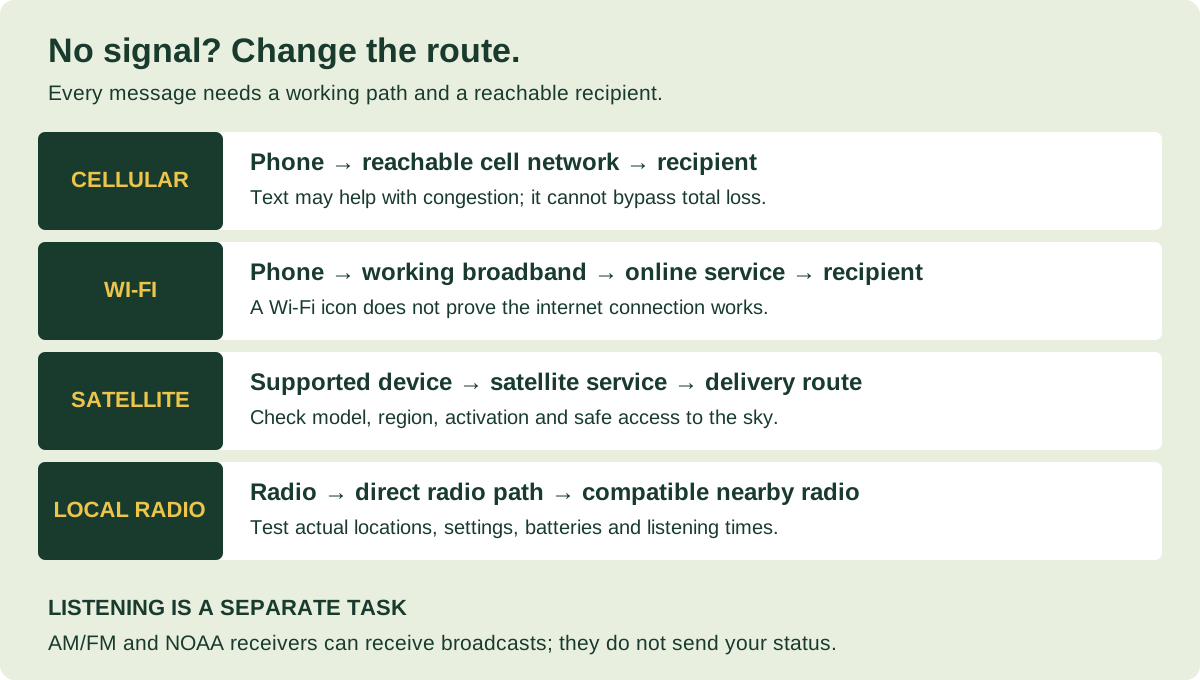
Choose a method by the route it uses, the person it can reach and what must be ready at both ends.
| Method | Needs your local cell towers? | What it can do | The important limit |
|---|---|---|---|
| Ordinary SMS / cellular calls | Needs reachable cellular service | Reach normal phone numbers when a usable route remains | Text can help with congestion; it is not off-grid communication |
| Wi-Fi Calling / internet apps | Not necessarily | Use working broadband to call or message | Router, upstream internet and service must work; mobile broadband may share the cellular failure |
| Satellite messaging / messenger | No local cellular link for the satellite leg | Supported text or emergency communication | Compatible equipment, coverage, setup and service conditions; recipient also needs a delivery route |
| Direct walkie-talkie link | No | Speak to someone nearby with a compatible radio | Actual range, matching settings, batteries and a listening person |
| Meshtastic / LoRa mesh | No for a local radio-only path | Exchange short messages between configured nodes | Requires hardware and a usable radio path; internet bridges are not independent of the internet |
| AM/FM or NOAA receiver | No | Receive available broadcasts | Does not tell your family you are safe or request rescue |
| Paper plan / safe meeting point | No | Coordinate agreed actions without a live message | Everyone needs the plan beforehand; movement must remain safe and permitted |
1. Use working Wi-Fi when the cellular network is unavailable
Wi-Fi is a local wireless connection. The internet connection behind it is a separate service. You can be connected to a router while that router has no usable route outside the building.
If fixed broadband still works, internet messaging apps can connect you to another person whose device and service are reachable. WhatsApp, Signal and similar internet messengers do not become long-distance off-grid radios just because both people have installed the app.
Prepare Wi-Fi Calling before you need it
Check whether your carrier and phone support Wi-Fi Calling, enable it, and confirm the emergency address if prompted. Apple’s current instructions explain how to enable the feature and note that not every Wi-Fi network supports it. Use the official Wi-Fi Calling instructions; Android menus and carrier requirements differ.
Practical check: at home, confirm a normal call over Wi-Fi using your carrier’s indicator or instructions. Check what happens to your modem, router and any separate fiber terminal when household power fails. Backup power for just the router may leave another required box unpowered—and cannot repair an upstream outage.
If your “home internet” is a cellular router, find out which network supplies it. Two devices can appear to be backups while depending on the same infrastructure. Work this into your apartment power outage checklist.
2. Check satellite messaging eligibility before relying on it
Satellite communication can bypass a local cell-site outage, but “satellite capable” is not one universal feature. Separate three questions: can the device contact emergency services, can it message family, and is that function available where you are?
Phone satellite features: verify your exact combination
Check the manufacturer and carrier for your model, software, country, account and plan. Emergency SOS and ordinary family messaging have different eligibility rules. Some carrier-provided services also differ from the phone manufacturer’s satellite service.
Apple documents Messages via satellite separately from Emergency SOS via satellite. Its family-messaging service needs a supported iPhone, software and region; SMS support can depend on the carrier. Google’s Pixel Satellite SOS instructions describe an emergency service with its own device and location requirements. Do not assume an SOS feature also supports ordinary family chat.
Before an outage, use the manufacturer’s demo if offered, update the device and save the instructions offline. Connection may require an unobstructed view of the sky and following on-screen positioning directions. Buildings, terrain and foliage can interfere. Only go outside if conditions make that safe.
Dedicated satellite messengers are a separate option
A dedicated messenger may suit someone who regularly travels beyond cellular coverage. Check activation, ongoing service requirements, charging, standalone controls and the recipient’s reply process before purchase. Garmin provides an inReach service-verification and testing guide; use the instructions for your exact model to confirm a genuine satellite test rather than a message sent through the paired phone’s internet connection.
A satellite sender does not guarantee delivery to a recipient whose phone, internet and local networks are all unavailable. Agree on an out-of-area relay contact who is less likely to share your local outage. Satellite service also has its own infrastructure and availability limits; it is another route, not a promise of instant delivery.
3. Use walkie-talkies for a tested local connection
Two-way radios can be useful between nearby family members or neighbors because a direct radio link does not require a cell tower or home internet. They do require a compatible radio at each end, enough battery power and someone listening.
In the U.S., properly operated FRS radios are licensed by rule, while GMRS generally requires an individual FCC license. See 47 CFR 95.305 and 95.1705. Other countries have different services and equipment rules; U.S. settings are not a worldwide permission to transmit.
For a simple household arrangement, write down the channel, tone or code setting, who carries each radio and when they will listen. Test from the places you actually expect to use: inside the apartment, at the nearby meeting point and along an ordinary route when conditions are safe.
Do not plan around a box’s maximum-mileage claim. Buildings, terrain, antenna position and interference change the usable range. A repeater can extend some radio systems, but then its power and availability become another dependency.
“Privacy codes” do not make ordinary FRS conversations private. They filter what you hear; other listeners can still receive transmissions. Island County’s emergency management guidance explains the settings and why matching code numbers across brands may need testing. Read its practical radio guidance. Avoid broadcasting passwords, medical details or a detailed account of an empty home.
What about Meshtastic and mesh messaging?
Meshtastic’s documentation describes a system using LoRa radio hardware, with a phone or computer connected to a node. A phone app alone does not create that radio network. A usable local mesh needs configured, compatible nodes and a working radio path.
This can be an additional project for an interested, prepared group. It is not a dependable last-minute download for contacting someone across a city. Test the actual participants and locations. A bridge that forwards messages through the internet still depends on that internet connection.
4. Receive official information separately from family messages
“How do I contact someone?” and “How do I learn what is happening?” need different answers. A broadcast receiver answers the second question.
In the U.S., NOAA Weather Radio carries weather and other hazard information without a phone data connection. It requires a receiver that can tune its frequencies; an ordinary AM/FM-only radio cannot necessarily receive NOAA channels. Local transmitter coverage and outages still matter.
For broader news and local instructions, identify usable AM/FM stations and write down their frequencies. In the UK, the government’s checklist specifically recommends an FM battery or wind-up radio. Choose equipment suited to your country and local broadcasts.
A radio can keep you informed while leaving you unable to send a message. Compare receiver features in our emergency radio buying guide, then test reception in your home. Do not assume a phone’s wireless alerts are a substitute for a separate receiver: Wireless Emergency Alerts use cellular broadcasting infrastructure.
YOUR PRACTICAL TAKEAWAY
Build a family communication plan that survives a dead phone
Start with decisions everyone can remember. The worksheet below is an original R&R planning tool, not an official emergency instruction. Choose arrangements that fit local guidance, access needs and the places your household actually spends time.
- Name one out-of-area contact and a backup. Ask permission and give them the household list. A distant person may be able to collect updates if local connections are patchy; distance alone does not guarantee availability.
- Choose a short message format. Use: name, status, location, immediate need, next check-in. Example: “Alex safe at home. Staying here. No urgent help needed. Next check-in 6 pm local.” This is a fictional example, not a required interval.
- Set realistic check-in windows. Pick times, the time zone and what counts as a confirmed reply. Agree what happens if a message arrives late or someone misses a window. Do not wait for a scheduled check-in before seeking urgent help.
- Choose nearby and farther-away meeting places. Record the address, access arrangements and an alternative if the first place is unsafe. Do not automatically travel during an evacuation restriction or shelter instruction.
- Include people who need another arrangement. Record school pickup rules, caregiver contacts, mobility support, accessible message formats and anyone who does not own a smartphone. A group chat alone does not cover them.
- Give everyone an offline copy. Keep a paper card in a wallet or bag and a copy at home. Save useful maps and instructions on the phone too, but do not make that the only copy.
Your communication card
Fill this in, then print it or save a plain-text copy. Entries stay in this page’s memory and are not submitted by this tool. Reloading clears them. Keep completed copies private.
Prefer paper? Download the blank two-page family communication plan (PDF).
Try a 15-minute practice session
Pick an ordinary day. Have one person read the paper plan while another tries the backup route. Confirm that the relay contact knows what to pass on, check that everyone can find the meeting address and note any missing cable or inaccessible instruction. This is a suggested household exercise, not a tested performance claim. Use phone satellite demos or manufacturer-approved test functions; do not trigger a real SOS or make an unscheduled emergency-services test call.
Keep the communication equipment usable
A charged device is necessary, but power does not replace a missing signal. Build a small kit around the equipment you already own:
- A charged power bank and the correct cables, tested with the actual phone.
- A paper contact and meeting card protected from moisture.
- A working broadcast receiver, with the batteries or charging method it requires.
- Any two-way radios or satellite device your plan genuinely uses, with instructions and power arrangements.
- Offline maps and essential information in a format each person can use.
Reduce unnecessary screen use and use the phone’s battery-saving features. If you switch off a radio connection or use airplane mode to save power, you may stop receiving calls or alerts through that route. Agree when to check again and turn the needed connections back on. Keep devices dry and safely accessible.
Buy for a specific gap. A power bank addresses charging; an AM/FM/NOAA receiver addresses information; a paired set of legal two-way radios addresses local conversation. None does all three. Begin with our beginner household plan and the editable go-bag checklist before adding equipment.
Can you call 911 when cell towers are down?
Try emergency calling when you need emergency help. A compatible phone may use another available cellular network if your normal provider is unavailable. If no reachable network exists, an ordinary cellular emergency call still needs another route; “SOS” on a display is not a guarantee that a call will connect.
For the U.S., 911.gov advises calling when you can and texting when you cannot. Text-to-911 availability varies. Do not assume that a routine chat app, local walkie-talkie or mesh message reaches a dispatcher. State your location and the nature of the emergency clearly when connected.
On a supported device, follow the manufacturer’s Emergency SOS via satellite process if ordinary contact fails and the service is available. Save its instructions before you need them. Apple’s emergency satellite guide explains the sequence from trying an emergency call to using satellite text.
Ask your local emergency management office in advance how it will announce assistance locations or communication points during a widespread outage. Use a nonemergency contact for planning questions. During an incident, follow official local instructions and only travel to a confirmed help point when safe. Outside the U.S., use the local emergency number and locally supported services.
Common questions about communicating without cell service
Can text messages work when phone calls do not?
Sometimes, if a usable network route remains and voice service is congested. Ordinary SMS does not bypass a completely unavailable cellular network. Satellite messaging and internet messaging are separate routes with separate requirements.
Will WhatsApp work if cell towers are down?
It can work over a functioning internet connection, such as working fixed broadband over Wi-Fi. Installing it does not provide off-grid long-distance communication. Both the service and the recipient’s connection must be usable.
Can a mobile hotspot get around the outage?
Only if it uses a connection that still works. A hotspot using the same unavailable cellular network does not create a new external route. A different carrier may help in some incidents, but it can share infrastructure or be affected too.
Do walkie-talkies need cell towers?
A direct compatible radio-to-radio link does not. Its reach depends on the equipment and surroundings, and someone must be listening. Repeater-assisted operation adds dependence on the repeater.
What is the cheapest place to start?
Write down contacts, agree on check-ins and safe meeting arrangements, test existing Wi-Fi Calling, and locate charging cables. Pricey equipment cannot substitute for another person knowing the plan.
Sources, verification and editorial method
Checked October 29, 2026. This guide uses public government, regulator and manufacturer documentation. It is written for household planning, with U.S. emergency-number and radio-rule examples clearly marked. Device eligibility, coverage, fees and software change: confirm your exact service before relying on it.
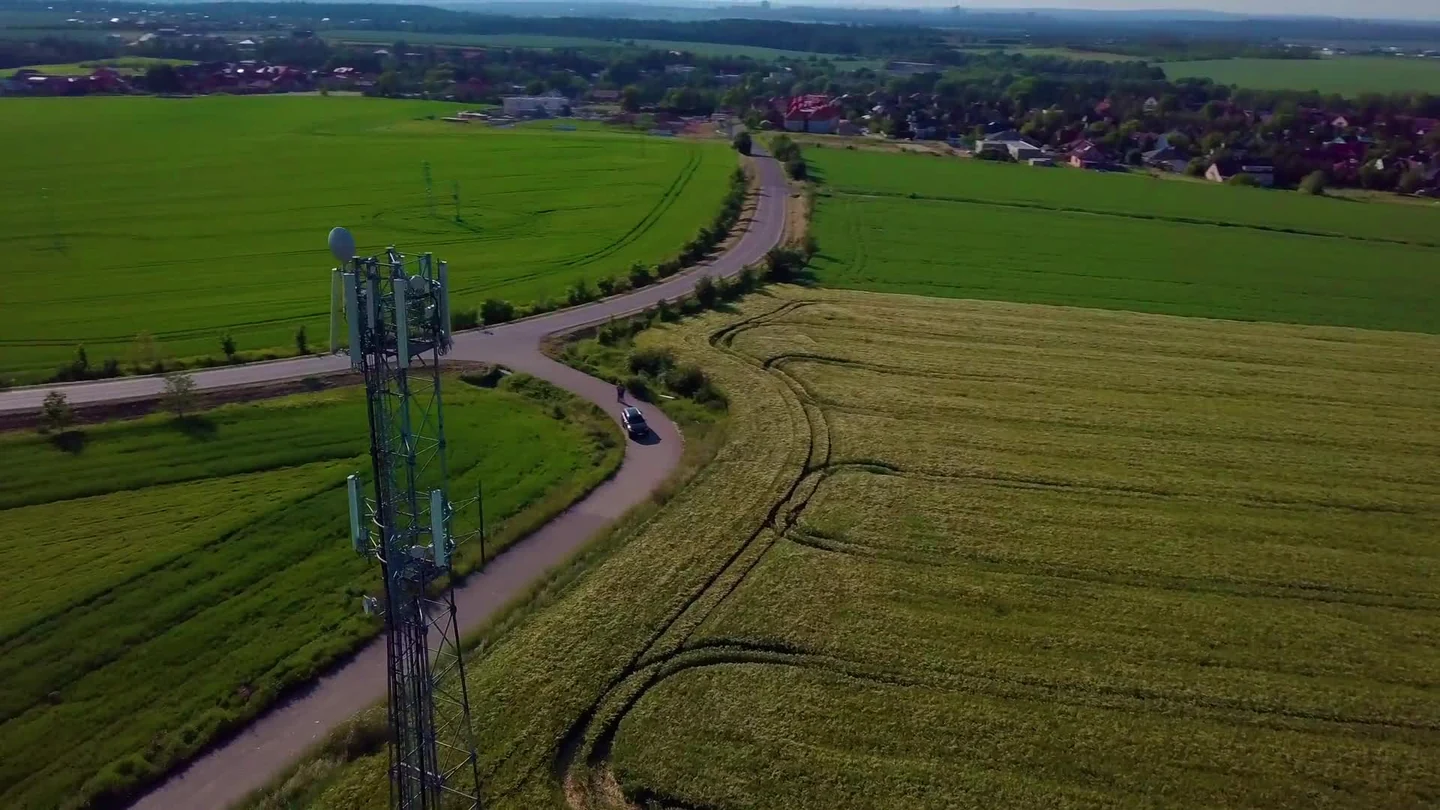
We did not conduct radio-range tests, simulate a public network outage or independently certify satellite delivery. The route comparison, worksheet, examples and practice session are R&R editorial tools. The heading image is a frame from real licensed cell-tower footage. The original narrated video uses illustrative stock footage and explanatory animation, not recordings of a documented outage. See our editorial standards and contact page for corrections.
- Garmin: verifying active inReach subscription and testing service
- UK government: Be Ready campaign announcement
- UK Be Ready: household checklist
- ISED Canada: staying connected in a telecommunications emergency
- Apple: Wi-Fi Calling
- Apple: Messages via satellite
- Apple: Emergency SOS via satellite
- Google: Pixel Satellite SOS
- eCFR: authorization under 47 CFR 95.305
- eCFR: GMRS licensing under 47 CFR 95.1705
- Island County emergency management: two-way radio use
- Meshtastic: getting started
- National Weather Service: NOAA Weather Radio
- National Weather Service: Wireless Emergency Alerts
- National 911 Program: calling and texting 911
- Apple: using emergency satellite text
Plan for a payment outage, too
If cards or ATMs are unavailable, a modest cash reserve can help with essential purchases. Use our guide to how much cash to keep for emergencies and its free household calculator to price your remaining needs.
Planning phone backup? Our emergency power-bank comparison and charging-budget calculator separates stored energy, refill speed and cable compatibility.