
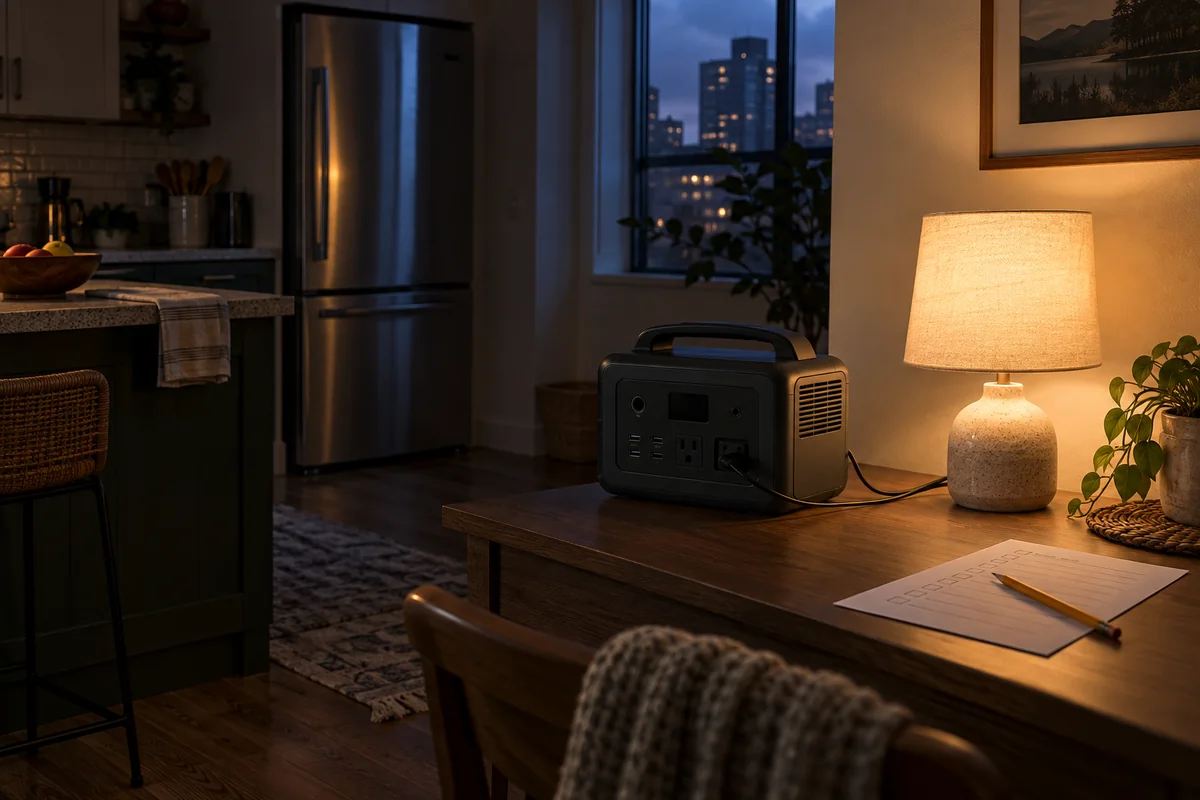
The first question I would ask about a backup battery is not how many sockets it has. It is which part of an ordinary evening I need to keep working. A phone, a light and a refrigerator are different jobs, and a portable power station only becomes useful when those jobs fit its energy budget. The BLUETTI Elite 100 V2 is worth considering in that space: selective backup for appliances and electronics, rather than a promise to keep an entire home running normally.
This research-based review covers the U.S. model. I checked its official product page and current user manual, compared the Anker SOLIX C1000 Gen 2, and worked through transparent runtime examples. There is no hands-on performance test behind the verdict. The useful result is a clearer buying decision: what to measure, which specifications matter and when another type of backup would make more sense.
My verdict before the specifications
I would put the Elite 100 V2 on a shortlist for a household that wants a movable battery for selected loads and has somewhere dry to operate it. The strongest case is a planned group of modest demands, with a recharge opportunity before the stored energy is exhausted. The weaker case is a buyer expecting continuous electric heating, unrestricted cooking or automatic whole-house backup.
That distinction matters more than the number of devices advertised. Four small loads can be manageable; one large load can use the available energy quickly. Before choosing the unit, write down the appliance you most want to preserve, its measured consumption and the number of hours you need. Our apartment power outage checklist helps organise the wider plan. Electricity is one part of it, alongside water, lighting, communications and access.
Capacity and output answer different questions
The published capacity is 1,024 watt-hours, while rated AC output is 1,800 watts. Capacity describes stored energy; output describes the load the inverter can supply at a particular moment. Two batteries with equal capacity can have different output limits. A larger inverter therefore does not automatically provide longer runtime for the same appliance.
I use a simple comparison. A 100-watt load operating continuously for eight hours requires 800 watt-hours at the load. That is already most of the nominal capacity before allowing for operating losses and the station's own consumption. A 1,500-watt load for ten minutes needs 250 watt-hours. Brief use can fit, but repeated high-power tasks compete directly with the energy reserved for everything else. These are arithmetic examples, not measured performance or appliance recommendations.
The official specifications are the starting point. Your appliance labels and actual usage determine the practical fit.
| Specification | Published value | Buying implication |
|---|---|---|
| Capacity | 1,024 Wh | Plan energy use over time |
| Rated AC output | 1,800 W total | Check simultaneous and starting loads |
| Battery chemistry | LiFePO4 | Follow operating and storage instructions |
| Approximate weight | 25.3 lb | Plan the actual carrying route |
| Maximum solar input | 1,000 W; 12–60 V; 20 A | Verify the complete compatible system |
What the Elite 100 V2 can realistically support
Think in tasks rather than a universal appliance list. Charging a phone keeps communications available. Running a lamp supports movement around the room. Keeping a laptop powered might preserve a working session. Refrigeration is a more demanding planning problem because compressor cycling, start-up behaviour and room conditions affect consumption.
For each task, identify whether you need AC or a compatible DC connection, whether the task must run continuously and whether interruptions are acceptable. Add the simultaneous loads instead of checking each one against the output limit independently. The number of available outlets is not an invitation to fill every one.
An appliance that uses heat deserves particular attention. The question is not simply whether the inverter can start it. Ask what that choice does to the remaining energy. A short cooking task and hours of space heating have very different consequences. Use our power-outage warmth guide to plan warmth beyond an electrical purchase.
Runtime examples with the assumptions visible
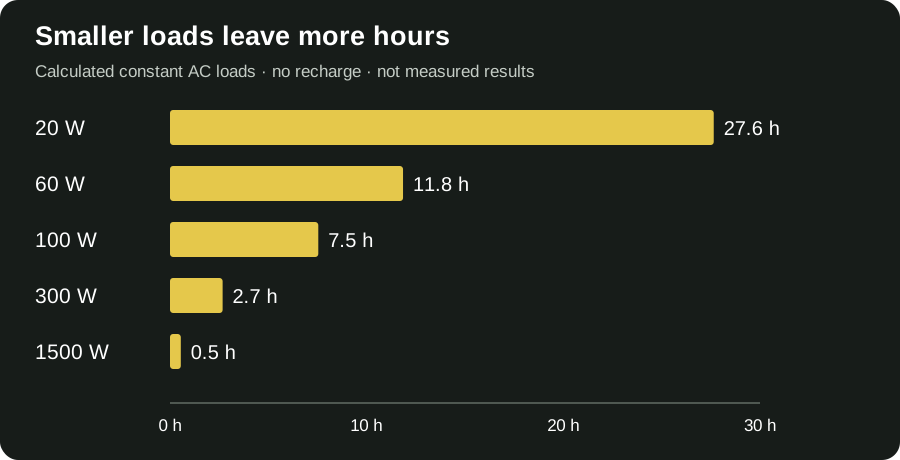
BLUETTI's manual provides a runtime method that accounts for discharge allowance, inverter efficiency and approximately 10 watts of self-consumption. For the chart below, I use a 90% discharge allowance and an assumed 90% efficiency. The calculation is 1,024 × 0.90 × 0.90 divided by the load plus 10. It starts from a full charge and assumes a constant AC load with no recharge.
That produces about 829 watt-hours in the numerator. Dividing by 110 watts gives roughly 7.5 hours for a hypothetical continuous 100-watt load. The distinction between continuous load and an appliance's average consumption is essential. A refrigerator does not necessarily consume its running wattage every minute, and a label alone cannot establish its average.
These figures are planning estimates, not bench-test results. They do not cover battery ageing, temperature effects, changing loads or every standby setting. Their purpose is to show how strongly load selection changes the answer.
| Continuous AC load | Calculated estimate |
|---|---|
| 20 watts | 27.6 hours |
| 60 watts | 11.8 hours |
| 100 watts | 7.5 hours |
| 300 watts | 2.7 hours |
| 1,500 watts | 0.5 hours (about 33 minutes) |
Formula: 1,024 Wh × 90% discharge allowance × assumed 90% efficiency ÷ (load W + 10 W overhead). Full starting charge; no recharge. Real loads, settings and conditions change runtime.
A refrigerator needs an energy record, not a guess
If food preservation is your main reason for buying, measure the refrigerator's energy use over a representative period before selecting a station. A compatible plug-in energy meter can record consumption; follow the meter and refrigerator instructions. Note the room temperature and ordinary door-opening pattern. Those observations are more useful than borrowing a runtime from someone else's fridge.
For example, suppose your own record indicates 800 watt-hours over 24 hours. Its average over that period is about 33 watts, even though operating power is higher when the compressor runs. The simple chart cannot be substituted for that record, and a compressor's starting demand still needs consideration. Do not promise a full day of refrigeration from a one-kilowatt-hour battery without accounting for losses and conditions.
During an actual outage, keep the door closed where practical and assess food using official guidance, not whether the station still shows charge. Our food safety during a power outage guide links temperature and timing decisions to authoritative sources. FoodSafety.gov's chart is the appropriate reference for food-specific decisions.
Starting demand and Power Lifting are separate issues
The rated-output figure should not be treated as a universal compatibility guarantee. Motors and compressors may need a higher starting demand than their ordinary running load. That is why identifying the exact appliance matters. Ask the appliance manufacturer or BLUETTI about uncertain compatibility instead of assuming any item below the headline wattage will behave the same way.
The manual also distinguishes Power Lifting from normal rated output. It is intended for suitable resistive heating loads and is not a general-purpose increase in power for electronics or motors. I would not use that headline feature as the reason to select a refrigerator backup.
For a buying decision, keep three entries separate: ordinary operating load, starting requirement and energy used over time. A successful start addresses the first few moments. The energy record addresses the rest of the evening. Neither establishes the other's answer, and neither replaces the instructions for the connected device.
A simple household load plan
Write a short priority list before buying. Put the tasks you cannot easily replace at the top, then list tasks that can wait or use another method. A rechargeable lamp may avoid keeping the AC inverter active just for one small light. A phone power bank may let you reserve the larger battery for a refrigerator. Those choices are about allocation, not a claim that every small accessory is automatically more efficient.
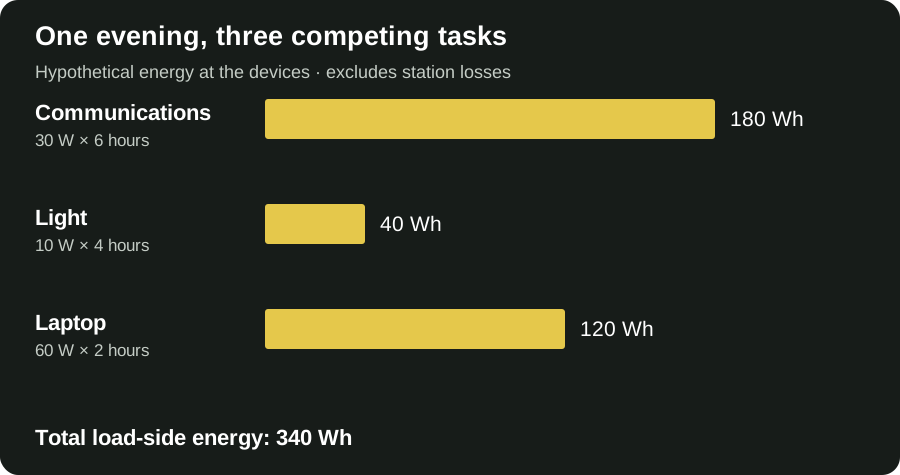
Our hypothetical evening uses a 30-watt communications load for six hours, a 10-watt light for four hours and a 60-watt laptop for two hours. Their load-side energy is 180, 40 and 120 watt-hours, or 340 in total. That total excludes station losses and must not be presented as a guaranteed remaining balance. It simply makes the tradeoffs visible before another device joins the list.
| Task | Example | Load-side energy |
|---|---|---|
| Communications | 30 W for 6 hours | 180 Wh |
| Light | 10 W for 4 hours | 40 Wh |
| Laptop | 60 W for 2 hours | 120 Wh |
| Total | Illustrative plan, not a tested setup | 340 Wh |
The 72-hour preparedness guide covers the rest of a household kit. A 72-hour planning period does not mean this battery powers all your chosen loads for 72 hours.
Recharging matters as much as the first discharge
A charged battery provides a finite reserve. The second day's question is where the next charge comes from. At home, consider whether you expect grid power to return, whether a safe charging location remains accessible and whether the household can realistically manage the equipment during the disruption.
BLUETTI advertises fast AC charging and a high solar-input ceiling. Those are useful specifications, but an input ceiling is not a prediction of the power a panel will deliver outside your home. A small panel does not become a larger panel because the station accepts more input. Cloud, shade, orientation and the compatible panel arrangement determine what is available.
I would price the complete recharge arrangement separately from the station. Identify required cables, panel storage and the place the equipment can be used. If your plan relies on solar during prolonged rain, describe what happens when that recharge opportunity is poor. That unresolved question deserves an answer before the purchase.
Solar compatibility is a system check
The U.S. manual lists a 1,000-watt solar-input ceiling with a 12–60-volt input range and a 20-amp current limit. Compatibility needs all of those limits checked, including a panel's open-circuit voltage. Matching a connector is not enough. Use the current manuals for the station, panel and cable combination, and get qualified advice for uncertain arrangements.
There is no wiring tutorial in this review. I would not build a shopping decision around an improvised connection or an assumed panel configuration. Decide first whether a compatible packaged system, an existing verified panel or no solar kit fits the household's use.
For camping, sunshine may make charging attractive, but the battery itself still needs a suitable operating location. A campsite is not automatically a protected electrical environment. Put weather protection, access and safe cable management into the same plan as meals, sleep and water. Our beginner camping checklist helps make those dependencies explicit.
Portability should match the way you actually move
The manual gives an approximate weight of 25.3 pounds. That is a different proposition from a small phone power bank. I would picture the real route from storage to use: a shelf, a doorway, stairs, a car and the final place where connected equipment sits. A handle does not remove those steps.
An apartment household may value room-to-room use without wanting to carry a battery during evacuation. A camper may be happy lifting it from a vehicle but not carrying it along a trail. Treat home storage, car camping and backpacking as separate use cases.
The bug-out-bag checklist is useful for portable personal essentials. Our day-hike checklist covers another distinct situation. I would not add a large power station to either list merely because the product is described as portable. Match the equipment to the transport plan and the people who will move it.
Elite 100 V2 versus Anker SOLIX C1000 Gen 2
The comparison is particularly useful because both manufacturers publish the same nominal capacity. Anker lists a higher rated AC output, while BLUETTI lists a higher maximum solar input. Those differences address different needs: simultaneous load capability on one side, and compatible recharge potential on the other.
Neither difference proves that one delivers more usable energy in every situation. That would require comparable testing under the same loads, settings and conditions. The chart deliberately compares published specifications, not a performance score or a fabricated head-to-head test.
Also match the exact generation. The C1000 and C1000 Gen 2 are not interchangeable names. A bundle listing can mention an older model, an expansion accessory or a different regional outlet configuration. Check the model printed on the offer and the included equipment before using a comparison table to decide.
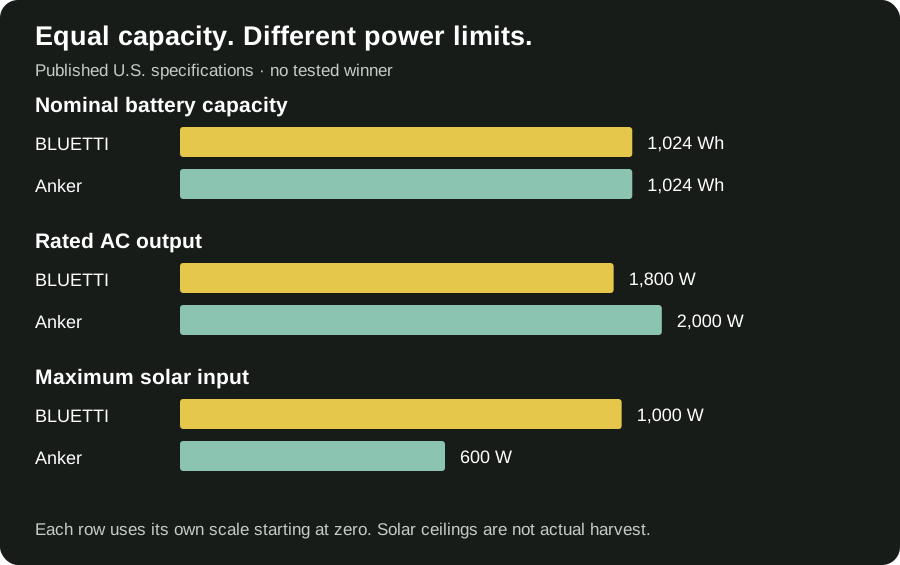
| U.S. specification | BLUETTI Elite 100 V2 | Anker C1000 Gen 2 |
|---|---|---|
| Nominal capacity | 1,024 Wh | 1,024 Wh |
| Rated AC output | 1,800 W | 2,000 W |
| Maximum solar input | 1,000 W | 600 W |
| Approximate weight | 25.3 lb (manual) | 24.9 lb (product page) |
Sources: each manufacturer’s current U.S. page and the BLUETTI manual linked below. Input ceilings do not establish recharge time or measured solar performance.
COMPARE EXACT MODELS
Check current model listings
As an Amazon Associate I earn from qualifying purchases. These buttons open model searches; confirm the generation, seller and included equipment.
My practical preference would depend on the appliance record and recharge arrangement. Equal capacity makes the energy plan important for both. A buyer with one specific compatibility concern should resolve it with the manufacturer rather than treating a small specification advantage as a universal win.
A power station versus a power bank or fuel generator
A phone power bank serves a narrower job. If your plan only involves charging a phone and small USB equipment, a large AC power station may add cost and weight without answering a real household need. The useful question is which output and energy budget your devices require.
A fuel generator raises a different set of operating requirements. It can replenish energy through fuel rather than relying only on stored battery charge, but it introduces exhaust, placement, fuel handling and maintenance considerations. It is not an indoor substitute for a battery. The CDC's carbon-monoxide guidance explains the hazard; follow applicable generator instructions and official safety directions.
I would compare the whole operating arrangement, not just the purchase price. A battery's constraints include finite energy and recharge access. A generator's constraints include a safe place to run it. Neither purchase removes the need for a household plan, and neither should be selected from a headline promising to power everything.
UPS claims deserve a device-specific check
The Elite 100 V2 has a published transfer-time specification, but a portable station with backup switching is not automatically suitable for every sensitive load. The current manual includes a restriction concerning devices that require high-performance UPS protection. That is more useful to a careful buyer than a blanket promise that nothing will ever reboot.
If an uninterrupted service matters, establish the connected device's requirements with its supplier. For medical equipment, arrange an appropriate backup plan with the equipment provider and clinician. A consumer review cannot approve a life-support arrangement or substitute for that consultation.
For an ordinary router or working laptop, decide what interruption is acceptable and verify the actual configuration before relying on it. Internet access can also fail outside the home, even when the router has power. Include offline contacts and information rather than making communications depend entirely on one powered device. The beginner preparedness guide is a useful starting point.
Settings can change an otherwise sensible plan
Read the current manual before relying on low-power or intermittent loads. Automatic shutoff settings are an important example: equipment that draws little power, or pauses between cycles, can behave differently from a continuous load. Review the applicable ECO-mode instructions rather than assuming that an output will remain active indefinitely.
I would also distinguish a successful everyday trial from proof of emergency reliability. A trial can establish whether the household understands the controls, where the cables belong and whether the equipment works with the intended device in that configuration. It cannot guarantee every future condition.
Record the settings and the date alongside the equipment plan. After changing firmware, an appliance, a cable or the storage location, revisit the relevant part of the record. This is a manageable household task, not a reason to create a complicated monitoring system. The person expected to use the unit should be able to find the instructions and operate the intended controls.
Keep the battery plan separate from flood exposure
A station used indoors still needs a dry, appropriate location with the clearances and conditions required by its manual. Do not turn a battery purchase into permission to work around standing water or damaged electrical equipment. If flooding threatens the location, follow local instructions and prioritise getting people to safety.
Our El Niño home preparedness guide connects power planning with property concerns and warnings. The regional flood-risk guide explains why the route and address matter. Neither means that a specific home will flood because an El Niño event is present.
Power also does not settle water and sanitation questions. A pump-dependent arrangement can stop during an outage, while gravity-fed arrangements may behave differently. Use the toilet and power-outage guide to understand that distinction, and the water shut-off checklist for a separate interruption. A charged display is not proof that household services are available.
Build a storage and review routine
Choose a location where the unit can be accessed without moving a stack of possessions. Keep the relevant cables and instructions identifiable. A battery that is charged but separated from its required cable leaves an avoidable gap. Record who knows how to use it and what the household intends to connect.
Check the manufacturer's storage and maintenance instructions rather than inventing a universal recharge schedule. Review the current state of charge before forecast disruptions and planned trips. Inspect equipment in accordance with its instructions, and take damaged equipment out of the plan until the appropriate support provider has advised you.
Our emergency supply storage guide helps organise limited home space. The camping gear storage guide covers the related problem of equipment that moves between trips and everyday storage. Keep your emergency water supplies in their own plan rather than treating electricity as a substitute for them.
Where I would compare buying options
Compare the exact model, included cables, regional voltage, seller identity, delivery details, returns and warranty terms. A discounted bundle may be useful, but only if the extra equipment fits your plan. Avoid paying for a panel or charging accessory you cannot safely use or store.
I would not publish a permanent cheapest-price claim here. Offers change and different bundles can make a direct price comparison misleading. Use the manufacturer's product page to confirm the specification and the retailer's current listing to confirm what is being sold. The buying links are a convenience, not evidence of stock, approval of an unknown seller or proof of appliance compatibility.
A buying checklist that keeps the decision practical
Before ordering, finish five entries: the critical task, measured or documented energy demand, required operating hours, compatible recharge opportunity and suitable operating location. Then check the exact unit and accessories against those entries. A missing answer is more important than a longer feature list.
Ask whether you can meet some tasks using supplies already available. A charged phone power bank, a battery lamp or an offline contact card might preserve the larger station's energy for a task only it can support. That can make the complete plan more useful without increasing the size of the purchase.
Write down what you will do if the battery cannot be recharged. That may mean reducing loads, changing plans or following an official instruction to leave. For the wider context, use the 72-hour household checklist alongside the appliance plan. Preparation is a sequence of decisions, not a cart full of equipment.
Questions readers ask
Can the BLUETTI Elite 100 V2 run a refrigerator?
It may suit a compatible refrigerator, but model-specific starting requirements and measured energy use determine the answer. Do not turn a generic runtime example into a guarantee. Check compatibility with the suppliers and keep food decisions tied to temperature and official guidance.
How long does the Elite 100 V2 last during an outage?
There is no single duration. Our estimated constant-load examples show how changing the watts changes the hours. They assume a full charge, a stated discharge allowance, assumed efficiency and station overhead, with no recharge. Your actual arrangement can differ.
Is it a solar generator?
That phrase commonly describes a battery-and-panel arrangement. The station stores energy; compatible solar equipment can recharge it. Check whether the offer includes panels and required cables. A station-only offer does not become a complete solar kit through its name.
Is the Anker C1000 Gen 2 better?
The published output and solar-input ceilings differ, while nominal capacity matches. Better depends on your loads, compatibility, recharge arrangement and buying terms. This comparison does not establish a tested winner.
Can it power a whole house?
This guide concerns selected plug-in loads. Whole-house integration is a different electrical project. Never connect a station's output to household wiring through an improvised arrangement; consult qualified professionals about any permitted integration.
My final buying view
The Elite 100 V2 makes the most sense when you can name the loads and explain the recharge plan. I would buy around those answers, not a promise that a compact box will make a disruption feel normal. A clear appliance record, a dry operating location and a complete household checklist give the specifications a purpose.
If your priority is sustained heating, a complex medical arrangement or whole-house continuity, begin with the appropriate specialist plan. If it is selective power for ordinary electronics and a verified appliance, this is a credible model to investigate. The next step is to confirm the exact configuration, not assume the purchase completes preparedness.
How this review was researched
Reviewed October 14, 2026. R&R compared official U.S. specifications and the current BLUETTI manual. Charts are our calculations or comparisons of published figures, not laboratory measurements. Context scenes show outage planning with generic equipment; they are not photographs of a BLUETTI test. We have not performed hands-on tests or received manufacturer certification.